How to Fix a Solar System That Shuts Down Automatically?

Time:2026-10-21 Author:Madeline
0%

A solar system that shuts down without warning can leave a home dark, a battery inactive, or a business unexpectedly exposed to grid interruptions. The first question is not “How do I restart it?” but “why do solar systems shut down automatically?” The answer may involve grid instability, inverter overheating, arc-fault detection, insulation problems, battery protection, or an activated rapid-shutdown device.

Bill Brooks, P.E., a widely respected photovoltaic safety engineer, explains, “Rapid shutdown is a safety function, not a substitute for troubleshooting.” That distinction matters. A red inverter light may indicate a harmless communication issue, while repeated shutdowns during bright midday conditions may suggest excessive heat, poor ventilation, or a wiring fault. Small clues matter.

This guide introduces a practical method for finding the cause safely. It covers inverter displays, monitoring applications, circuit breakers, battery-management warnings, and shutdown events recorded in system logs. You will also learn when basic observations are reasonable and when a qualified solar professional should inspect the equipment. Do not open energized equipment or bypass protective controls. That can worsen damage.

Real systems are not always neat. A system may restart at sunset, then fail again the next morning. Weather can hide the pattern. Even experienced owners can misread a warning code. Therefore, record the time, temperature, weather, error message, and recent electrical changes before taking action. A careful diagnosis may seem slower. It is usually safer, clearer, and less expensive.
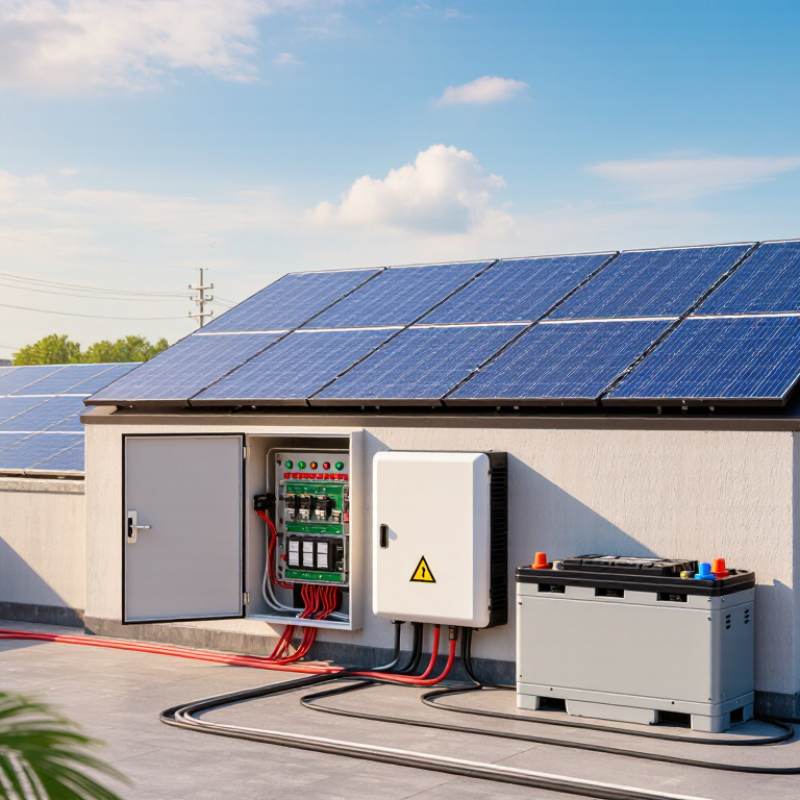
How to Fix a Solar System That Shuts Down Automatically?

Identify the Cause of the Solar System Shutdown

How to Fix a Solar System That Shuts Down Automatically?

Identify the Cause of the Solar System Shutdown

An automatic shutdown usually indicates protection, not immediate equipment failure. Check the inverter display first. Record the fault code, shutdown time, weather, and battery charge level. A grid outage, unstable voltage, overheating, or low battery state can trigger protective disconnection. The IEA PVPS Trends 2024 report recorded more than 400 GW of new solar capacity in 2023. As installations grow, consistent fault diagnosis becomes increasingly important.

Inspect the system only from a safe distance. Look for tripped breakers, damaged cables, water near equipment, blocked ventilation, or unusual heat. Do not repeatedly restart the system. A loose connector may create resistance and heat, while repeated resets can hide the original fault. NREL’s PV Fleet Performance Data Initiative shows that inverter availability and environmental conditions can materially affect energy production. The first diagnosis may be wrong. A trained technician should test insulation, grid voltage, grounding, and battery communication.

Tips: Keep a simple shutdown log. Include the time, temperature, sunlight, and displayed code. Clean air vents without opening electrical covers. Check whether nearby appliances caused a voltage change. If burning smells, cracking sounds, or exposed conductors appear, switch off the system only if the procedure is clearly marked, then contact a qualified professional. A missing code is still useful evidence.

Check the Battery, Inverter, and Safety Protection Devices

How to Fix a Solar System That Shuts Down Automatically?

A solar system may shut down because its battery voltage falls below the inverter’s safe operating limit. Check the battery display before touching any cables. A reading below the recommended range can indicate deep discharge, aging cells, or a loose connection. Inspect terminals for white residue, heat marks, or movement. Tighten connections only when the system is safely isolated. Never open a battery enclosure without proper training.

The inverter usually stores a fault code or warning history. Look for overload, overheating, ground-fault, and low-voltage messages. A dusty air inlet or direct afternoon heat can raise internal temperature quickly. Reduce heavy loads and allow the unit to cool. Then compare its settings with the battery manufacturer’s requirements. Settings can be wrong, even after a recent installation. That detail is easy to miss.

Safety protection devices also deserve careful attention. Check whether a circuit breaker, fuse, isolator, or rapid-shutdown device has tripped. Do not repeatedly reset a device that trips again. It may be protecting the wiring from a serious fault. Record the time, weather, battery level, and active appliances when the shutdown occurs. This pattern helps a qualified technician diagnose the cause. My own inspection habits are not perfect; a normal voltage reading can hide a damaged cable or intermittent fault. Stop testing if you smell burning, see melted insulation, or hear unusual buzzing.

How to Fix a Solar System That Shuts Down Automatically? - Check the Battery, Inverter, and Safety Protection Devices
Possible Cause Typical Symptom What to Check Typical Reference or Reading Recommended Action Priority
Battery state of charge is too low The inverter turns off at night, during cloudy weather, or when a large appliance starts. Measure battery voltage with the charging and load sources isolated where safe. Check the battery monitor and recent discharge history. A 12 V lead-acid battery is often near full at about 12.6–12.8 V at rest and heavily discharged below about 12.0 V. Voltage varies with battery type, temperature, and load. Reduce nonessential loads and allow a complete recharge. Use the battery manufacturer’s recommended charge settings and avoid repeated deep discharge. High
Battery voltage drops under load The system appears charged at rest but shuts down when a pump, compressor, heater, or other high-current load starts. Compare battery voltage at rest with voltage while the appliance is operating. Inspect battery age, capacity, temperature, and terminal condition. A sudden voltage sag under load can indicate high internal resistance, inadequate capacity, low temperature, or a poor connection. Test the battery under a suitable load. Replace a defective battery with the correct type and capacity, and check that the inverter’s surge rating matches the load. High
Loose, corroded, or undersized battery cables The inverter restarts intermittently, displays low voltage, or shuts down when current increases. Visually inspect terminals, fuses, cable lugs, crimped connections, and cable insulation. Look for heat discoloration or corrosion. Connections should be clean, tight, correctly sized, and protected against accidental short circuits. Excessive voltage drop indicates a cable or connection problem. Switch off the system according to the installation procedure before servicing. Have a qualified person clean, tighten, or replace damaged conductors. Urgent
Inverter overload The inverter stops when several appliances run together or when a motor starts. Check the inverter’s continuous power rating, surge rating, and the combined running and starting wattage of connected loads. Motor-driven equipment can require several times its normal running power during startup. The actual requirement depends on the appliance and operating conditions. Disconnect unnecessary loads and restart using the prescribed sequence. Use a suitably rated inverter or stagger motor starts if permitted. High
Inverter overheating Shutdown occurs on hot days, after prolonged operation, or when the inverter is installed in a confined space. Check ventilation openings, cooling fans, ambient temperature, dust buildup, and clearance around the inverter. Many inverters reduce output or shut down when their internal temperature exceeds a protected operating limit specified in the installation manual. Allow the unit to cool, improve airflow, clean only as instructed, and keep it away from direct heat. Do not bypass thermal protection. High
Solar array or charge controller fault The battery does not recharge during daylight, or the charge controller repeatedly enters fault mode. Check controller status, array voltage and current, shading, damaged cables, connectors, fuses, and isolation devices. Array voltage and current should remain within the controller’s specified input range. Readings vary with sunlight, temperature, and array configuration. Review fault codes and wiring diagrams. Do not disconnect or reconnect live solar connectors unless the equipment instructions specifically allow it. Medium
AC or DC protective device has tripped The system is completely off, or only the backup output or charging function is unavailable. Check the status of correctly labeled breakers, fuses, residual-current protection, battery disconnects, and surge protection indicators. A tripped device may indicate overload, short circuit, ground fault, surge, or equipment failure; the cause must be identified before repeated resetting. Reset only once if the equipment instructions permit it. If it trips again, isolate the system and contact a qualified solar electrician. Urgent
Battery management system protection A lithium battery suddenly disconnects even though the inverter display shows an available charge. Check battery alarms for low or high voltage, excessive current, high or low temperature, and communication errors. Protection thresholds are battery-specific. The battery management system may disconnect the battery to prevent unsafe operating conditions. Remove excessive loads and follow the battery reset and recovery procedure. Never bypass the battery management system or open a sealed battery. Urgent
Grid or generator input abnormality The inverter switches modes, rejects the input, or shuts down when an external AC source is connected. Check input voltage, frequency, neutral and grounding arrangement, transfer-switch status, and applicable fault messages. The acceptable voltage and frequency window is defined by the inverter and local electrical requirements; it is not universal. Do not alter grid, generator, neutral, or grounding wiring without a qualified electrician. Correct the source or configuration according to the approved design. Urgent
Ground fault, insulation fault, or moisture The inverter reports an insulation or ground fault, especially after rain or washing. Look for damaged insulation, water ingress, cracked connectors, exposed conductors, and fault history without touching energized parts. Insulation resistance limits and test methods depend on system voltage and applicable electrical standards. Keep the system isolated if there is visible damage, burning, sparking, or water ingress. Arrange professional insulation and grounding tests. Urgent
Incorrect settings or communication failure Shutdowns begin after commissioning, a firmware change, battery replacement, or loss of communication. Review battery type, nominal voltage, charge limits, low-voltage cutoff, operating mode, time settings, and communication cables. Cutoff, restart, and charge values must match the battery and inverter instructions. There is no single safe setting for every system. Record the existing settings before changing anything. Restore approved configuration values and obtain professional help if compatibility is uncertain. Medium
Safety note: Solar panels and batteries can remain energized even when the inverter is switched off. Do not remove covers, bypass protective devices, disconnect live conductors, or work on AC/DC wiring unless you are qualified and following the system shutdown procedure and applicable electrical regulations.

Inspect Solar Panels, Wiring, and System Connections

A solar system that shuts down automatically may be protecting itself from a connection fault. Begin with a visual inspection during daylight, without opening energized equipment. Look for cracked panels, dark burn marks, loose conduit, damaged insulation, or water around junction boxes. Even when the inverter is off, panels can produce dangerous DC voltage. Do not guess.

Check the wiring path from the panels to the inverter and battery, if installed. Terminals should be tight, dry, and free from green or white corrosion. Examine connectors for gaps, melting, or exposed metal. Rodents sometimes damage cable insulation, while strong wind can loosen rooftop clips. A cable that looks acceptable may still fail under load. This is where rushed inspections often miss the real problem.

Inspect the system connections at the AC disconnect, DC disconnect, grounding points, and distribution panel. Record warning lights and shutdown times before resetting anything. Repeated resets can hide an overheating or voltage problem. If the shutdown follows rain, heat, or heavy household demand, note that pattern. Stop work if you smell burning, hear buzzing, or find melted parts. A qualified solar electrician should test voltage, continuity, insulation, and grounding with suitable equipment. DIY testing is not worth the risk.

Reset the System and Test Each Component Safely

An automatic shutdown is often a protective response, not a simple software problem. The system may detect overheating, low battery voltage, overload, poor ventilation, or an electrical fault. Record the shutdown time and any warning codes before resetting anything. These details can reveal patterns that a quick restart might hide.

Turn off connected loads, follow the system manual, and use the required disconnect sequence. Keep hands dry, remove loose jewelry, and never open energized equipment. Wait for the stated discharge period. I once treated a repeated shutdown as a battery issue, but blocked airflow was the real cause. My assumption delayed the repair. Check vents, cable insulation, terminals, and unusual smells without touching damaged parts. Stop immediately if you see burns, swelling, sparks, or melted plastic.

Reset the system only after the area looks safe. Reconnect one section at a time, then observe the display and cooling fans. Test each component separately, including the battery, inverter, charge controller, and major loads. Use a properly rated meter only if you are trained to measure electrical systems. Otherwise, ask a qualified electrician to perform live testing. Keep a written record of voltage readings, temperatures, and load behavior. One restart is not proof of a repair. Repeated shutdowns need professional diagnosis, especially when fault codes return or the equipment becomes hot.

Prevent Future Shutdowns With Regular Maintenance

How to Fix a Solar System That Shuts Down Automatically?

Regular maintenance is the most practical way to prevent unexpected solar shutdowns. Dust, leaves, loose connections, and heat can reduce performance or trigger protective controls. During routine inspections, technicians often find that small faults were ignored for months. A clean system usually operates more consistently.

Check the panels monthly for heavy dirt, bird droppings, cracks, or shading from new branches. Look at cables and mounting points from the ground. Do not climb onto a roof without proper training and safety equipment. A qualified electrician should inspect wiring, grounding, protective devices, and the inverter at least once a year. They can also test voltage and review stored fault codes.

Keep a simple maintenance record with inspection dates, weather conditions, and unusual shutdown times. This evidence helps reveal patterns. After strong winds, hail, or flooding, arrange an additional inspection before restarting the system. Never keep resetting a system without finding the cause. That habit can hide a serious electrical problem.

Maintenance is not glamorous.

Even careful owners miss warning signs. I have seen minor shading become a major output loss because nobody checked nearby tree growth. Cleaning too aggressively can also scratch panel surfaces. Use manufacturer-approved methods, or hire a trained professional when the situation feels uncertain. Regular checks should be careful, documented, and realistic rather than rushed.

How to Fix a Solar System That Shuts Down Automatically?

Prevent future shutdowns with regular maintenance

Regular inspections help identify common shutdown triggers such as inverter overheating, loose electrical connections, shading, blocked ventilation, and fault alerts. The chart presents a practical maintenance-planning benchmark: systems checked more frequently are expected to experience fewer unplanned shutdown hours. Actual results vary with system age, climate, equipment condition, and installation quality.

Maintenance planning benchmark; not a guarantee of system performance. Always follow the equipment manufacturer’s safety procedures and use a qualified solar technician for electrical work.

FAQS

Why does a solar system shut down automatically?

Common causes include low battery voltage, overheating, overload, poor ventilation, or an electrical fault. It may be protecting itself.

What should I check before touching any cables?

Read the battery display and inverter warnings first. Check for low voltage, fault codes, heat, burning smells, or unusual buzzing. Do not guess.

How can I inspect the battery safely?

Look for white residue, loose terminals, heat marks, or movement. Isolate the system before tightening connections. Never open the battery enclosure without training.

What should I do if the inverter shows overheating?

Reduce heavy loads and let the inverter cool. Check dusty air inlets and blocked vents. Direct afternoon heat can worsen the problem.

How do I inspect panels and wiring?

During daylight, look for cracked panels, dark marks, damaged insulation, loose conduit, and water near junction boxes. Panels can still produce dangerous voltage.

What does a tripped breaker or fuse mean?

It may indicate overload, overheating, or a wiring fault. Do not repeatedly reset it. A repeated trip needs qualified diagnosis.

Can I reset the system myself?

Only follow the manual’s disconnect sequence, with connected loads turned off. Keep hands dry and wait through the required discharge period. One restart proves little.

How can I identify the real cause of repeated shutdowns?

Record the time, weather, battery level, warning codes, temperature, and active appliances. Test components separately when qualified. My assumptions can be wrong; blocked airflow once seemed like a battery problem.

Conclusion

When a solar system shuts down automatically, the first step is to identify the likely cause, such as low battery voltage, inverter faults, overheating, grid interruptions, or a triggered safety device. Inspect the battery, inverter, breakers, fuses, and protection equipment for warning signals or visible damage. Then examine the solar panels, wiring, connectors, and system terminals for dirt, loose connections, corrosion, or physical problems. Understanding why do solar systems shut down automatically can help you troubleshoot more efficiently and avoid unnecessary resets.

After identifying possible issues, safely isolate the system before resetting it according to its operating instructions. Test each component separately and monitor performance after restarting. If the shutdown continues, consult a qualified technician rather than repeatedly switching the system on and off. Regular maintenance, including panel cleaning, connection checks, battery inspections, ventilation checks, and review of system alerts, can reduce unexpected shutdowns and help maintain reliable energy production.

Madeline

Madeline

Madeline is a dedicated marketing professional with a wealth of expertise in our company's core offerings. With a keen understanding of the industry, she brings a unique perspective to her role, consistently delivering high-quality content that highlights the superior aspects of our products. As......