Solar batteries store valuable energy, but heat can quietly reduce their performance and service life. High temperatures may accelerate cell degradation, trigger protective shutdowns, or create serious safety concerns. This guide explains how to protect solar batteries from overheating through practical, evidence-based maintenance.
Start with the installation environment. Keep the battery in a shaded, dry, and well-ventilated area. Avoid enclosed cupboards, uninsulated sheds, and locations beside boilers or dark metal walls. A battery cabinet should allow the clearances specified by its manufacturer. Do not cover ventilation openings, even during dusty weather. Small details matter.
Monitor temperature regularly. Many modern battery systems provide readings through an inverter app, while external sensors can support independent checks. Watch for unusual heat, rapid performance changes, warning codes, or swelling. Stop using the system and contact a qualified installer if these signs appear. Never open the battery enclosure yourself.
Cleaning around vents can help airflow, but water and compressed air may cause damage. Follow the product manual instead. Professional inspection is especially useful before summer, after electrical faults, or when the battery operates in a hot climate. Experienced installers can check connections, firmware, ventilation, and charging limits more accurately than visual inspection alone.
No checklist is perfect. Shade may shift across the day, and a cool morning can hide afternoon heat buildup. Review local conditions, manufacturer guidance, and the battery’s warranty requirements together. Safe habits are simple, but consistency protects both the equipment and the people nearby.
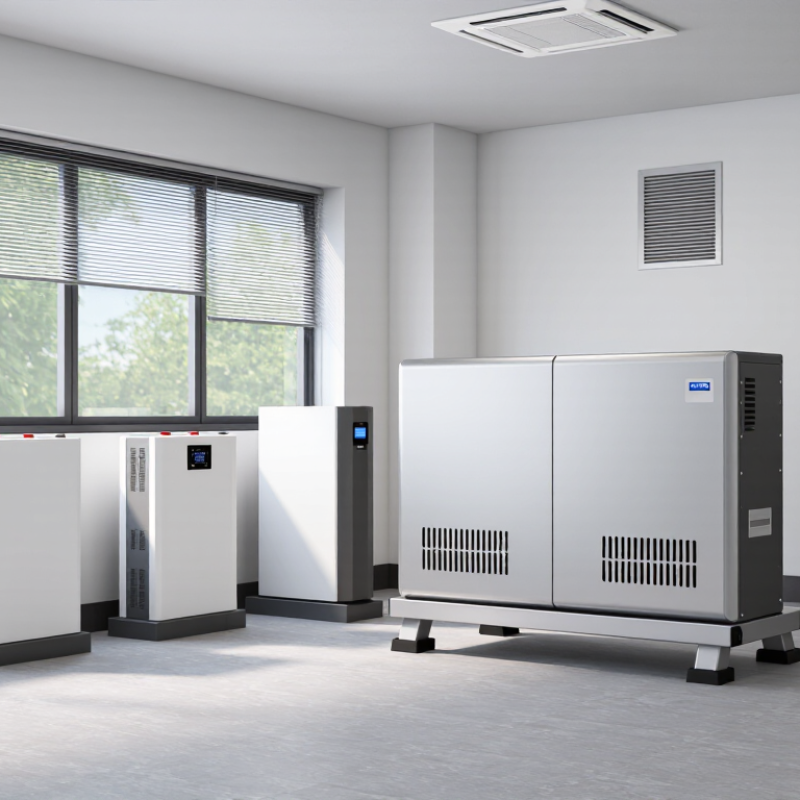
Solar batteries overheat when heat enters faster than it can escape. Charging and discharging naturally create internal heat. High current, damaged cells, poor ventilation, or a faulty connection can raise temperatures further. Direct sunlight makes the problem worse, especially inside a metal cabinet or a closed garage.
Ambient temperature matters. A battery mounted beside a boiler, window, or hot inverter may begin the day already warm. Dust can also block ventilation openings and reduce airflow. Loose terminals create electrical resistance, which produces heat at a small contact point. That detail is easy to miss. A warm cable or discolored connector deserves immediate attention.
Keep the battery in a shaded, dry, and well-ventilated area. Follow the manufacturer’s clearance requirements, and never cover ventilation openings with boxes or fabric. A temperature sensor can reveal gradual heating that feels harmless by hand. Check readings during sunny afternoons and heavy household use, not only in the morning. Reduce charging or discharging if temperatures exceed the permitted range, then contact a qualified technician. Do not open the battery enclosure yourself. One practical lesson is uncomfortable: a cooling fan may hide the symptom without fixing the cause. Regular inspection is safer than relying on alarms alone. Even careful maintenance has limits, and unusual smells, swelling, leaking, smoke, or repeated shutdowns require urgent professional attention.
| Dimension | What the Data Shows | Why Overheating Happens | Recommended Protection Measure | Risk Level |
|---|---|---|---|---|
| Battery operating temperature | Most rechargeable battery systems have a manufacturer-defined operating range. A commonly used reference point for battery performance and capacity ratings is approximately 25°C (77°F). | High ambient temperatures increase internal chemical activity and can accelerate capacity loss, especially when the battery remains hot for long periods. | Install the battery in a shaded, temperature-controlled location and always follow the temperature limits in the battery technical manual. | Medium |
| Direct sunlight | Outdoor enclosures exposed to direct sun can become significantly hotter than the surrounding air, particularly when the enclosure is dark, poorly ventilated, or placed against a heat-absorbing wall. | Solar radiation adds heat to the enclosure and reduces the battery’s ability to release heat. | Use a weather-rated enclosure with shade, reflective protection, adequate clearance, and ventilation designed for the specific battery system. | High |
| Insufficient airflow | Battery rooms and enclosures need enough space around the equipment for heat dissipation and safe servicing. | Blocked vents, cramped installation spaces, dust, or failed fans can trap heat around the cells and power electronics. | Keep vents clear, avoid storing objects near the battery, clean air pathways as recommended, and have cooling fans inspected periodically. | High |
| High charging current | Charging current produces heat inside the battery. The allowable current depends on battery chemistry, capacity, state of charge, and the manufacturer’s specifications. | Excessive current or an incorrectly configured charger can create more heat than the battery management system is designed to remove. | Set charge voltage and current according to the battery data sheet. Use a compatible charge controller and never bypass built-in protection systems. | High |
| High discharge load | Large appliances, inverters, pumps, and motors can draw high current, particularly during startup. | Internal resistance converts part of the electrical current into heat. Higher current generally causes greater heating. | Match the inverter and loads to the battery’s continuous and peak current ratings. Avoid connecting loads beyond the designed system capacity. | High |
| State of charge | Keeping a lithium battery at a high state of charge for extended periods can increase stress when the battery is also exposed to elevated temperatures. | Heat and high voltage can accelerate aging reactions inside lithium-ion cells. | Use the recommended charge limits and reserve settings. Do not intentionally overcharge or keep the battery at maximum charge unless the system requires it. | Medium |
| Battery chemistry | Lithium-ion and lead-acid batteries have different charging limits, ventilation needs, and temperature behavior. | Using the wrong charging profile can cause excess heat, reduced life, gassing, or protective shutdowns. | Configure the charger for the exact battery chemistry. Never apply lead-acid charging settings to a lithium battery or vice versa. | High |
| Lead-acid ventilation | During charging, some lead-acid batteries can release hydrogen gas, especially if overcharged or damaged. | Hydrogen accumulation creates a fire and explosion hazard, while charging also generates heat. | Use a suitable ventilated battery area, keep ignition sources away, prevent overcharging, and follow applicable electrical and safety codes. | High |
| Temperature monitoring | Battery management systems commonly monitor cell or pack temperature and may reduce power or disconnect the battery when limits are exceeded. | A faulty sensor, disconnected cable, or unavailable monitoring system can allow abnormal temperatures to go unnoticed. | Check temperature alerts regularly and review system logs. Investigate repeated warnings instead of repeatedly resetting them. | Medium |
| Early warning signs | Unusual heat, swelling, leaking, hissing, strong odor, smoke, repeated shutdowns, or rapidly falling performance are abnormal conditions. | These symptoms may indicate cell damage, overcharging, internal faults, or thermal runaway risk. | Stop using the affected battery if it is safe to do so, isolate the area, keep away from smoke or fumes, and contact a qualified battery technician or emergency service. | High |
| Installation clearance | Clearance requirements vary by battery design, enclosure, ventilation method, and local electrical regulations. | Installing the battery too close to walls, ceilings, heaters, or other equipment can restrict heat transfer and raise the surrounding temperature. | Maintain the clearances specified by the installation manual and keep the battery away from boilers, furnaces, hot pipes, and other heat sources. | Medium |
| Routine inspection | Periodic inspections can identify blocked vents, loose connections, corrosion, damaged cables, and enclosure deterioration before they become serious faults. | Loose or damaged electrical connections can increase resistance and generate localized heat. | Have a qualified professional inspect wiring, terminals, fuses, ventilation, sensors, and enclosure condition at the interval recommended for the system. | Medium |
| Extreme weather planning | Heat waves can raise battery temperature even when the system is operating normally. | Continuous high ambient temperature reduces the cooling margin and may trigger thermal protection. | Improve shading and airflow before hot weather, reduce unnecessary loads where practical, and monitor temperature alerts during heat waves. | Medium |
Temperature limits, charging settings, ventilation requirements, and emergency procedures vary by battery chemistry and system design. Always use the battery manufacturer’s technical documentation and applicable local safety regulations as the final reference.
Temperature changes can reveal blocked airflow, failing fans, loose connections, or excessive charging. Heat leaves clues. Continuous monitoring supports earlier action.
Check temperature, charging current, discharge power, state of charge, and voltage trends. Compare readings with local weather and operating conditions.
Many perform well near 20–25°C, but the correct range varies. Follow the documented limits for your battery and enclosure. Do not guess.
Watch for unusual heat, swelling, hissing, sharp odors, error messages, reduced capacity, or sudden shutdowns. One module may run warmer than others.
Stop charging or discharging if safe shutdown is available. Leave the area when smoke, flames, or rapid heating appear. Contact qualified emergency support.
No. Sensors can be miscalibrated, and dashboards can miss airflow problems. The app can lie. Pair remote alerts with physical inspections.
Use a shaded, dry, well-ventilated location. Keep recommended clearance around the enclosure. Remove cardboard, fuel, tools, and heat-sensitive materials nearby.
Check ventilation openings for dust. Confirm cables remain tight, dry, and undamaged. Record alarms with time, load, and ambient temperature.
No. Do not open, move, or cool it yourself. Stop abnormal operation and wait for a qualified technician. My dashboard once looked normal, but airflow was restricted.
Protecting solar batteries from overheating begins with understanding the common causes, including high ambient temperatures, poor ventilation, direct sunlight, excessive charging, and heavy operating loads. To learn how to protect solar batteries from overheating, install the battery in a cool, dry, and well-ventilated location away from heat-producing equipment. Shade the installation area when possible, while keeping airflow unobstructed and avoiding enclosed spaces that trap heat.
Regular monitoring is also essential. Check temperature readings, charging behavior, energy output, and any unusual sounds, smells, swelling, or performance changes. Keep safety controls, temperature sensors, protective devices, and shutdown features in proper working condition. If the battery becomes unusually hot or shows warning signs, reduce the load if safe to do so, stop operation according to the system instructions, and seek qualified assistance. Routine inspections and timely maintenance can improve battery reliability, extend service life, and reduce the risk of heat-related damage.

 PlugVolt Charging