Why is my solar backpack not charging devices properly? The answer often begins with sunlight, not the USB port. NREL’s PVWatts model uses location, weather, and system details to estimate solar output. That matters outdoors: a panel facing the wrong way, partly shaded by a jacket, or spread across a cloudy trail can produce far less power than its label suggests. A backpack panel is small, too. Its rated output is a best-case figure, not a promise that your phone will charge quickly.
Solar modeling expert Aron Dobos helped develop NREL’s PVWatts tool. Its documentation explains that it “estimates the energy production and cost of energy” for photovoltaic systems. That estimate depends on real conditions, a useful reminder when comparing a sunny product-page claim with a dim campsite. For charging behavior, USB-IF’s USB Power Delivery specifications also show why compatibility matters: a device and charger must negotiate supported power levels. A panel may generate energy while delivering too little, or an unstable current, for a particular device to accept.
Check the small details. Inspect the cable, clean the panel, move it into direct sun, and test one device at a time. Let the panel sit still for several minutes. Heat, shade from a single strap, or a power bank’s input limits can change the result. Frustrating, but common. This guide examines seven likely causes and practical checks. One caveat: backpack panels differ widely, so a fix that works for one model may not work for another.
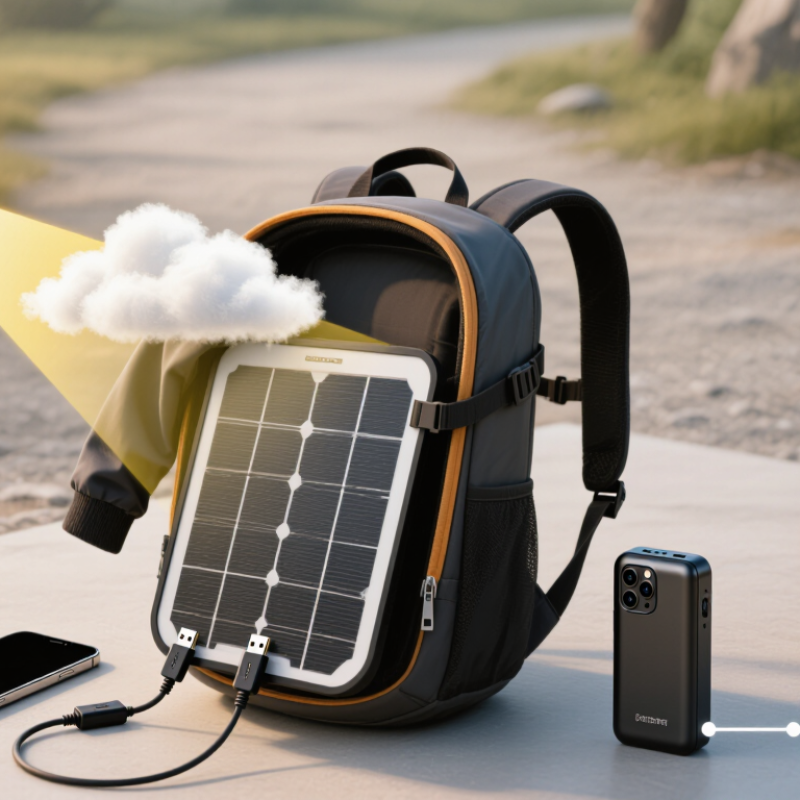
A solar backpack turns sunlight into electricity through photovoltaic cells sewn into or attached to its outer panel. When sunlight strikes the cells, their materials release electrons, creating direct current. The panel does not store that energy by itself. It produces power only while light reaches it.
A small controller helps manage the panel’s output, while a USB converter provides a usable voltage for compatible devices. Some backpacks connect directly to a phone; others work better with a separate power bank between the panel and the device. That battery stores energy when sunlight is available, then supplies steadier power later. Check the backpack’s instructions, because the setup varies.
Conditions matter. A panel facing the sun on a clear afternoon may produce more power than one shaded by a coat, tree, or your own shoulder. Even thin clouds can reduce output, and a phone may draw more power than a small panel can provide. I used to think bright daylight meant reliable charging; that assumption misses heat, angle, and changing shade. Small details count. Keep the panel uncovered, position it toward the sun when practical, and check whether the power bank’s indicator shows incoming charge before relying on it for a full battery.
| Tip | Possible Issue | Why It Affects Charging | What to Check or Try | How It Relates to Power Conversion |
|---|---|---|---|---|
| 1. Check the available sunlight | Cloud cover, shade, or low-light conditions | Solar panels produce less electrical power when less sunlight reaches their cells. | Test the panel outdoors in bright, unobstructed sunlight. Remember that overcast conditions can reduce output. | Photovoltaic cells convert light into direct-current (DC) electricity; less incoming light generally means less DC power. |
| 2. Remove shade from the panel | A strap, flap, hand, tree, or nearby object covers part of the panel | Shading even part of a panel can lower its output, depending on the panel’s cell layout and electrical design. | Spread the panel flat and keep its surface clear. Check for shadows that move across it during use. | The cells generate electricity from light, so shaded cells contribute less to the panel’s total electrical output. |
| 3. Improve the panel’s angle | The panel faces away from the sun or lies at a poor angle | Direct sunlight reaching the panel usually provides more power than sunlight striking it at a shallow angle. | Reposition the backpack so the panel faces the sun more directly, then compare charging performance. | The amount of light reaching the photovoltaic cells affects how much DC electricity they can produce. |
| 4. Inspect the cable and connection | A loose, damaged, or incompatible cable or connector | An interrupted connection can prevent power from reaching the device, even when the panel is producing electricity. | Reconnect both ends, inspect the cable for damage, and use a cable and connector compatible with the charging port. | Generated DC power must travel through the backpack’s output connection to reach a device or compatible power bank. |
| 5. Check the device’s power requirements | The device needs more power than the panel can provide under current conditions | Output varies with sunlight and panel specifications. A phone may charge slowly or pause if available power is insufficient or fluctuates. | Compare the panel’s rated output and the device’s input requirements. Try charging a compatible power bank first if direct charging is unstable. | An output circuit may provide a regulated voltage, but regulation cannot create additional energy beyond what the panel receives and converts. |
| 6. Confirm whether a power bank is needed | The backpack has a panel but no built-in battery, or the connected power bank is not accepting a charge | Some solar backpacks send power directly to an output port; others require a separate power bank. Features vary by design. | Check the product’s instructions to confirm the intended charging path. If using a power bank, verify its input port and charging status. | A power bank stores energy for later use. The panel produces electricity, while the bank’s battery stores it as chemical energy. |
| 7. Keep the panel clean and in good condition | Dirt, moisture, creases, or visible damage on the panel or its wiring | Surface deposits can block light, while damaged cells or wiring may reduce or interrupt electrical output. | Follow the care instructions; gently clean the panel with a soft, slightly damp cloth and inspect it for cracks or loose wiring. | Light must reach functioning photovoltaic cells, and the electrical path must remain intact for usable DC power to reach the output. |
A loose cable, dirty port, or weak sunlight may interrupt charging. Check each connection carefully.
Unplug everything first. Look for bends, exposed wires, crushed sections, lint, grit, or moisture. Use a dry, soft brush for loose debris.
Yes. Try a cable you know works, then connect one device at a time. I have blamed the panel too quickly before.
Both devices may draw more power than the backpack provides, especially in changing sunlight. Test them separately.
Place it in direct sun, uncover every section, and check again after several minutes. A charging symbol does not prove steady power.
Yes. Charge it from a reliable wall adapter, then connect a phone with a working cable. Check its indicator lights and manual.
Repeated shutdowns, an empty battery, or unusual warmth may require service. Do not open a sealed battery pack.
Yes. A strap’s shadow can reduce output. Check the device’s charging settings and confirm that its port accepts the bank’s output. Small changes matter.
Note the sunlight, cables, devices, and battery level during each test. A basic USB power meter may help, but readings can change.
A solar backpack turns sunlight into usable power by converting light through its panel and sending energy to a connected device or stored battery. When charging is unreliable, start with the basics: check whether the panel receives strong, direct sunlight, sits at a useful angle, and is not covered by shade or dirt. Temperature, weather, and the device’s power needs can also affect charging speed. If you are wondering, “why is my solar backpack not charging devices properly,” these conditions are a good place to begin.
Next, inspect the cables, ports, and connected device for loose connections or visible debris, and try a different compatible cable or device if available. Check the backpack’s battery level and charging settings, since some models need to store power before outputting it. Finally, look for cracked panels, frayed wiring, or other damage. Minor connection issues may be easy to resolve, but damaged components should be assessed by a qualified repair professional.

 PlugVolt Charging